


Go Kinetic
4.311.15K Reviews
App Specs
- Version
- 6.0.4
- Updated On
- License
- Free
- Downloads
- 500,000+
- Developer
- Uniti Group
- Categories
- Business
- Platform
- Android
Screenshots
 Analysis by AppCompare
Managing a home internet account is rarely something I want to spend much time doing. I usually open an account app because I need one answer quickly: whether my service is working, what my bill requires, or where to find help. Go Kinetic, the business app from Uniti Group, is built around that practical purpose. It is free to download and is aimed at Kinetic customers who want account and connected-home access from a phone rather than a browser.
After using it as an everyday account companion, I found its appeal easy to understand. It puts routine service management in one place, without trying to become a general productivity tool or a complicated smart-home dashboard. That focused approach is its biggest strength, but it also defines its limits. The app is most useful when you already have Kinetic service and want a convenient mobile doorway into it; it is not a reason by itself to choose an internet provider.
What Go Kinetic is designed to handle
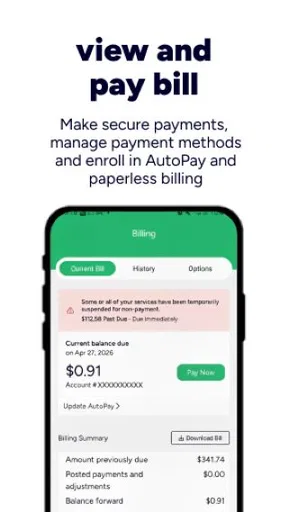
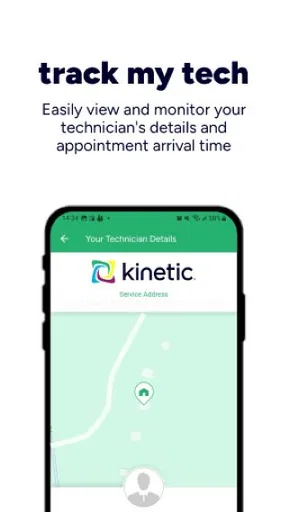
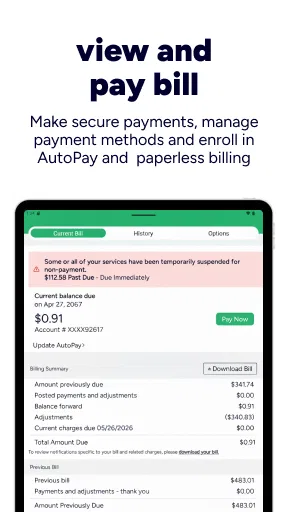
The app belongs in the business category, although its practical role is closer to a customer account and home-service control center. Its store summary describes quick management of a Kinetic account and connected home, and that distinction matters. This is not simply a page for checking a balance. It is intended to bring together the account side of your service and the home side of your connection.
That makes the first setup question very simple: do you already use Kinetic? If the answer is no, there is little reason to install it. The application is tied to the provider relationship, so its value comes from having an eligible account to manage. If you are already a customer, the app can reduce the need to remember a web address, search through old emails, or switch between several service pages.
The developer is Uniti Group, and the app has been available since late 2018. It has reached over half a million installs, with an average rating of 4.3 from around thirty thousand ratings and roughly eleven thousand written reviews. Those figures suggest an established customer tool rather than a brand-new experiment, while still leaving room for the normal differences in experience caused by account type, device, location, and service setup.
Go Kinetic is free, and that is the only purchase fact that needs serious attention here. You do not pay to download the app itself. That does not mean your internet service becomes free, of course; the app is a management layer for an existing Kinetic relationship. I consider it best to separate those two ideas: the mobile access costs nothing, while any service charges belong to the account you are managing.
The content rating is Everyone, which fits the app’s purpose. It is a household utility, not entertainment or a social platform. The current version is 6.0.4 and it requires Android 6.0 or later. That minimum makes it accessible on many older Android phones, although smooth performance will still depend on the individual device and its software condition.
Worth Reading Before You Choose

EA SPORTS FC Mobile 26 Is a Bigger Football Game, but It Takes Time

Flipboard Shows What News Apps Must Do Beyond the Feed

Switching to Android Auto Means Rethinking Your Driving Routine

Google Calendar Makes a Crowded Week Easier to Manage

Ludo King Makes the Most of the Minutes Between Plans

Baby Panda World Brings Quick Play to Modern Phones, but Its Game Library Feels Busy
The first useful test is speed of access
When I judge an account app, I do not begin with how many screens it contains. I begin with how quickly it helps me complete a small task. Go Kinetic makes sense when I can open it, identify the relevant account area, and finish without treating the phone like a miniature customer-service maze.
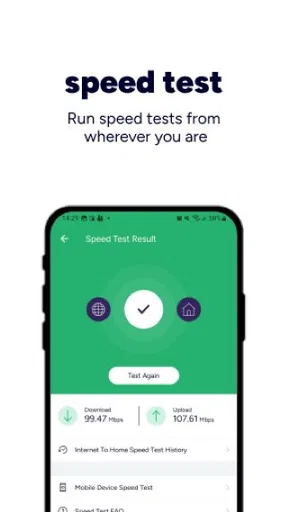
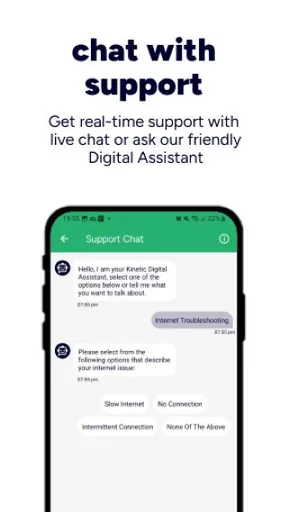
A realistic example is a weekday evening when the home connection feels unreliable. Instead of opening a laptop, I can use the phone to check the account and connected-home side of the service. That does not magically repair every network problem, but it gives me a more direct place to begin than guessing whether the issue is my router, my account, or the wider service.
Another ordinary situation is moving between work and home responsibilities. If I need to review service information while away from my desk, a dedicated app is more comfortable than repeatedly zooming around a mobile browser. The benefit is not dramatic; it is the small reduction in friction that makes routine account tasks less annoying.
Where the connected-home focus helps
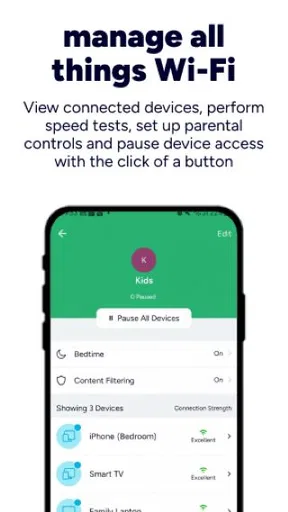
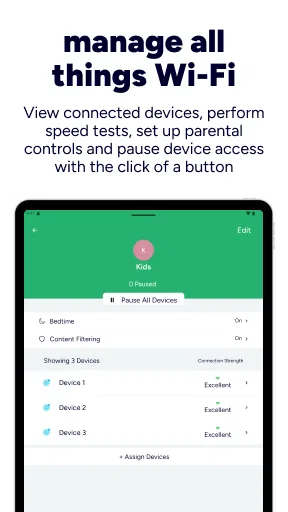
The connected-home emphasis is more useful than a bare billing shortcut because internet service is not experienced only as an account number. At home, the practical question is often whether the connection and the equipment supporting it are behaving normally. A provider app that brings those concerns closer together can help me organize the problem before I contact support.
There is also a useful mental separation between service administration and home troubleshooting. I can think about the account when the issue is administrative, then shift toward the connected home when the issue is about access or equipment. That structure is more helpful than a generic provider webpage that presents every possible topic in one long menu.
One tip I would give new users is to install and sign in before an outage or urgent problem occurs. Account apps are most frustrating when they are first opened under pressure. Setting up access while the connection is working gives you time to understand where account information and home-management tools live, and it avoids making a service interruption the first test of the app.
What the free price really means
Because Go Kinetic is free, the value question is straightforward: there is no app purchase to recover. I would not evaluate it as though it were a paid finance tool or a premium smart-home platform. Its value is convenience layered on top of a service you already use. If it saves even a few unnecessary browser visits or makes account access easier, it has done enough to justify keeping it installed.
That free access also changes how I view imperfections. A slightly awkward screen or a task that still sends me toward support is inconvenient, but it is not a financial loss from buying the wrong app. The more important cost is time. If the app makes a simple task slower than the provider’s mobile website, then the free price does not automatically make it worthwhile.
I also would not confuse the app with a complete replacement for every provider interaction. An account application can organize information and guide you toward the right action, but complicated service questions may still require customer support. The sensible expectation is quicker self-service for routine needs, not a promise that every technical or billing situation can be solved inside the phone.
Where the experience is strongest and where it slows down
My favorite aspect of Go Kinetic is its narrow purpose. It does not need to compete with general banking apps, messaging platforms, or elaborate smart-home ecosystems. When an app is tied to one provider, I prefer it to make the provider relationship understandable rather than fill the screen with unrelated extras.
The account-and-home combination is particularly practical for households where more than one person deals with service issues. One person may handle payments or account details while another notices connection trouble. A shared, provider-specific tool gives both people a common starting point, even if they use it for different reasons.
There is a trade-off, though. A focused provider app is useful only inside that provider’s world. A household with several internet, mobile, security, or smart-home services may prefer a broader tool that combines information across companies. Go Kinetic cannot be judged as a universal home technology organizer because its strength comes from being specific to Kinetic.
The same issue appears when comparing it with the usual alternative: a mobile browser. The browser is more flexible and does not require another installed application. It may also be preferable if you manage several providers and want all services in one place. The dedicated app wins when you repeatedly return to the same account and want a consistent path to it.
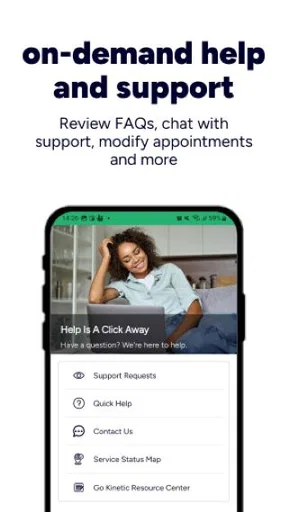
Compared with calling support, the app should be more convenient for simple account checks and first steps around the connected home. Calling remains the better route when the situation is complicated, urgent, or difficult to describe through menus. I would use the app to collect basic context before contacting support, not insist on self-service when the problem clearly needs a person.
Small workflows that make it more worthwhile
A useful habit is to treat the app as a first-response tool. When something feels wrong, I would open Go Kinetic before restarting every device in the house. That order helps avoid random troubleshooting. First check the account or service context, then inspect the home connection, and only afterward move to broader fixes or support.
A second practical workflow is to use it during a change of household routine. If you are working from home, hosting visitors, or relying on the connection for a long video call, checking the service through the provider app before the important moment can give you a clearer starting point. It cannot guarantee perfect performance, but it is more useful than discovering account-access problems at the worst possible time.
A third insight is that the app can reduce the difference between “the internet is down” and “something in the home needs attention.” Those two situations feel identical when all you see is a disconnected device. A provider-specific account and connected-home view encourages a more disciplined diagnosis. That is a modest benefit, but it is exactly the kind of benefit that generic app descriptions tend to overlook.
I would also keep the mobile browser available as a fallback. Dedicated apps occasionally behave differently after an update, during sign-in, or on older hardware. Having another route to your account is sensible, especially if you depend on the connection for work. The app is a convenience, not something that should become your only way to reach essential service information.
Who will get the most value
Go Kinetic is a good fit for existing Kinetic customers who manage their service from an Android phone. It is especially appropriate for people who prefer a dedicated account app over a browser, households that want a clearer place to begin with connected-home concerns, and users who handle routine service matters away from a computer.
It can also suit less technical family members because the purpose is easier to understand than a collection of unrelated networking tools. The app’s role is not to teach you advanced networking. It gives you a provider-specific route into the service you already pay for, which can be reassuring when you do not want to interpret router terminology or hunt through support pages.
On the other hand, I would skip it if you are not a Kinetic customer, if you rarely manage your account yourself, or if your preferred setup is a single browser bookmark for every provider. People who want detailed network analytics, deep device controls, or a unified dashboard across brands should look for tools designed specifically for those jobs rather than expect them from this account app.
It is also not the right choice as a buying argument for internet service. Since the app is free, it adds no paid upgrade value to compare against another provider’s subscription. Choose the service based on availability, performance, support, and account terms; then use Go Kinetic if it makes that existing relationship easier to handle.
What to expect before installing
The Android requirement is relatively approachable: the app works from Android 6.0 onward. Still, I would check that your phone has enough free space, a stable connection for installation and sign-in, and current system software where possible. Older compatible devices may open the app successfully but feel less responsive than newer phones, so the minimum operating-system requirement should not be mistaken for a performance guarantee.
It is worth having your Kinetic account details ready and using the same account information you normally use for service management. If you are installing it only because someone else in the household mentioned a connection problem, first confirm that you are the person with the appropriate account access. That simple check can prevent an unnecessary setup detour.
For privacy and security, I would use the same basic care as with any service account: install the genuine app from the official platform, avoid sharing sign-in details casually, and sign out or protect the phone if other people regularly use it. These are not special claims about Go Kinetic; they are sensible habits whenever an app provides access to household service information.
My verdict on the value of Go Kinetic
I see Go Kinetic as a practical free companion rather than an essential standalone application. Its value comes from reducing friction for people who already use Kinetic service, particularly when they want account access and connected-home management in the same mobile experience. The established install base and solid 4.3 average indicate that many customers find that role worthwhile, although an average rating cannot predict how every account or device will behave.
The trade-off is clear. You gain a focused provider tool, but you give up the flexibility of a general browser or the broader controls of a dedicated network-management platform. Some problems will still belong to customer support, and users with multiple providers may prefer a single cross-service routine. Those are not deal-breakers; they simply define where this app stops being the best option.
My recommendation is simple: if you are a Kinetic customer and regularly manage your home internet from an Android phone, install it and judge it by the time it saves on your first few real tasks. Learn the account and connected-home sections before you need them, and keep the browser as a backup. If you do not have Kinetic service or want advanced, provider-independent network control, skip it.
Go Kinetic earns its place through convenience, not extra cost or spectacle. Since the app itself is free, the decision is low-risk. For the right household, that combination of account access and connected-home organization is useful enough to keep nearby; for everyone else, it is simply the wrong tool for the job.
Pros
- Simple interface makes tracking activities easy for beginners.
- Useful reminders can help users stay consistent with daily goals.
- Progress history makes it easier to review personal improvements.
- Works well for users who prefer short
- focused activity sessions.
- Clean design keeps key fitness information easy to find.
Cons
- Some features may require an account or additional permissions.
- Limited customization may not suit advanced fitness users.
- Activity tracking can be less accurate without reliable device sensors.
- Notifications may become repetitive during long-term use.
- Battery usage can increase when location tracking stays enabled.
FAQs for Go Kinetic
What is Go Kinetic and what can I use it for?
Go Kinetic is a mobile application designed to work with Kinetic services, helping users manage and interact with their account from an Android or iOS device. Depending on the services available in your area, the app may provide tools for checking account information, viewing service details, managing payments, receiving notifications, and accessing support. Available features can vary by location and subscription.
Do I need a Kinetic account to use the Go Kinetic app?
In most cases, you need an active Kinetic customer account to access the app’s main features. After installing Go Kinetic, you may be asked to sign in with your existing account credentials or create an account using information connected to your Kinetic service. Some general information may be visible without signing in, but account management tools normally require authentication.
Is Go Kinetic free to download and use?
Go Kinetic is generally free to download from the official Google Play Store or Apple App Store. However, downloading the app does not mean that Kinetic services themselves are free. Your internet, phone, television, or other service charges continue to depend on your selected plan and contract. Mobile data charges may also apply if you use the app while connected to cellular data.
Is Go Kinetic safe for managing my account and payments?
The official Go Kinetic application is intended to provide a secure way to access Kinetic account information and related services. Users should download it only from an official app store, verify the publisher before installing, and keep the application updated. Avoid sharing your password, use a strong unique login, and sign out on shared devices to reduce the risk of unauthorized access.
What should I do if Go Kinetic is not working or I cannot sign in?
If Go Kinetic fails to open, loads slowly, or rejects your login, first check your internet connection and confirm that you are using the correct account details. Updating the app, restarting your device, and clearing temporary app data may also help. If the problem continues, use the app’s support options or contact Kinetic customer service, especially for account, billing, or service-related issues.


